Unofficial fan game

Free browser game · No download

Pokemon Arena 2D? Play Poke2D Arena Free Online

Build your team, choose your moves, and battle friends or the computer. Play free in your browser.

Keyboard & mouse · Touch ⛶ Full screen Open in a new tab →

Real-Time 2D Battle Arena · Browser Edition

▶ Play Poke2D Arena Free Instant browser game · No download · Keyboard & mouse / Touch

Build your team, choose your moves, and jump into real-time Pokemon battles. Play against a friend, take on the computer, or explore sixteen Story Mode challenges. Free on computer and phone, with no download or account needed.

Game Versions & Development Roadmap

Built and updated here

Poke2D Arena is developed and operated by poke2darena.com. Read its public launch date, current release status and complete player-facing update history.

At a glance — Battle Specifications

  • Your team 3 Pokemon Switch your active teammate
  • Opponents Easy / Normal / Hard Choose a difficulty in Vs CPU
  • Types 18 types Strengths, resistances and immunities
  • Settings 6 arenas Grass, forest, seaside, volcano, ice, ruins
  • Combat Real-time action Move and aim your attacks
  • Access Free browser play No download or account needed

What You Can Do in Poke2D Arena

Direct control

Move, aim and switch in real time

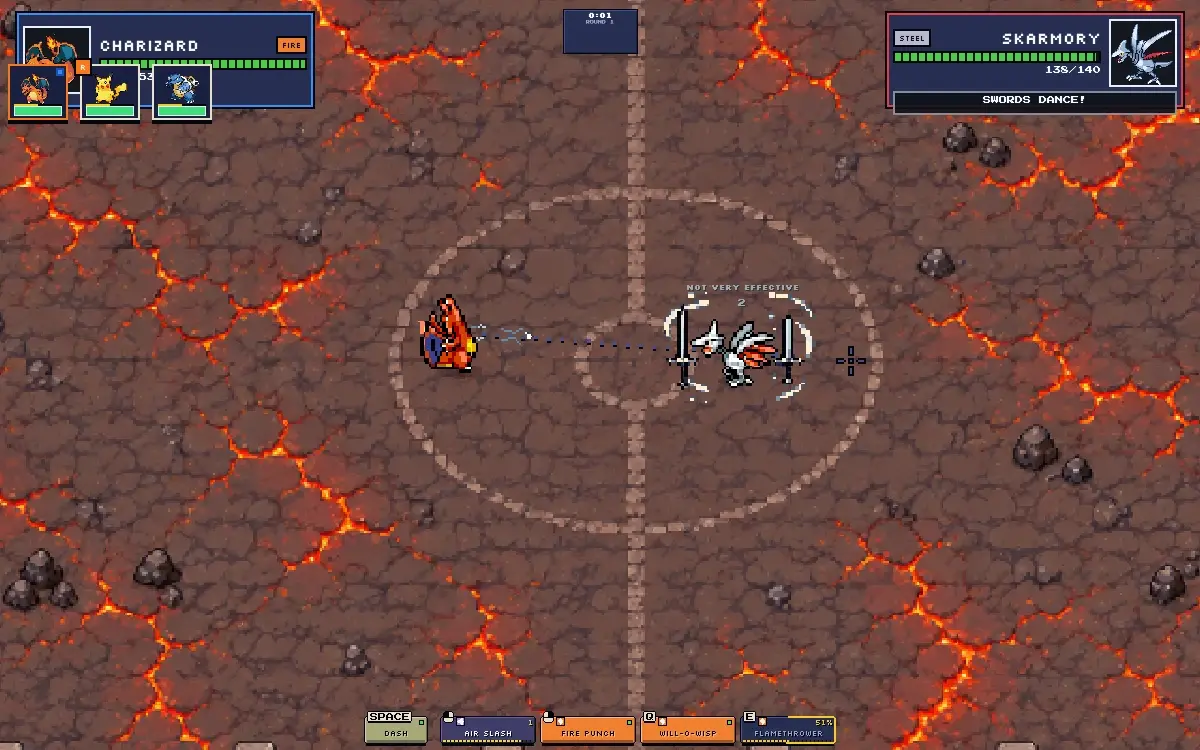
Take control of your Pokemon on the field. Move out of danger, aim your attacks, and switch teammates for a better matchup. Time your skills as they recharge and build up to your ultimate.

  • Computer controls: WASD or arrow keys to move, mouse to aim, and the move bar shows your attack shortcuts.
  • Phone controls: an on-screen joystick, touch move buttons and a tappable team bar.
  • A surviving teammate takes over when your active Pokemon faints. Lose your whole team and the battle ends.
  • The clock counts up during a computer battle. Rematch or change your team after the result.
See the current controls and quick start
Poke2D Arena computer battle with active Pokemon, health bars, team slots and move controls
Current browser edition: a real-time battle against the computer, with team and move controls on screen.
Build your trio

Your Pokemon, your moves, three teams to try

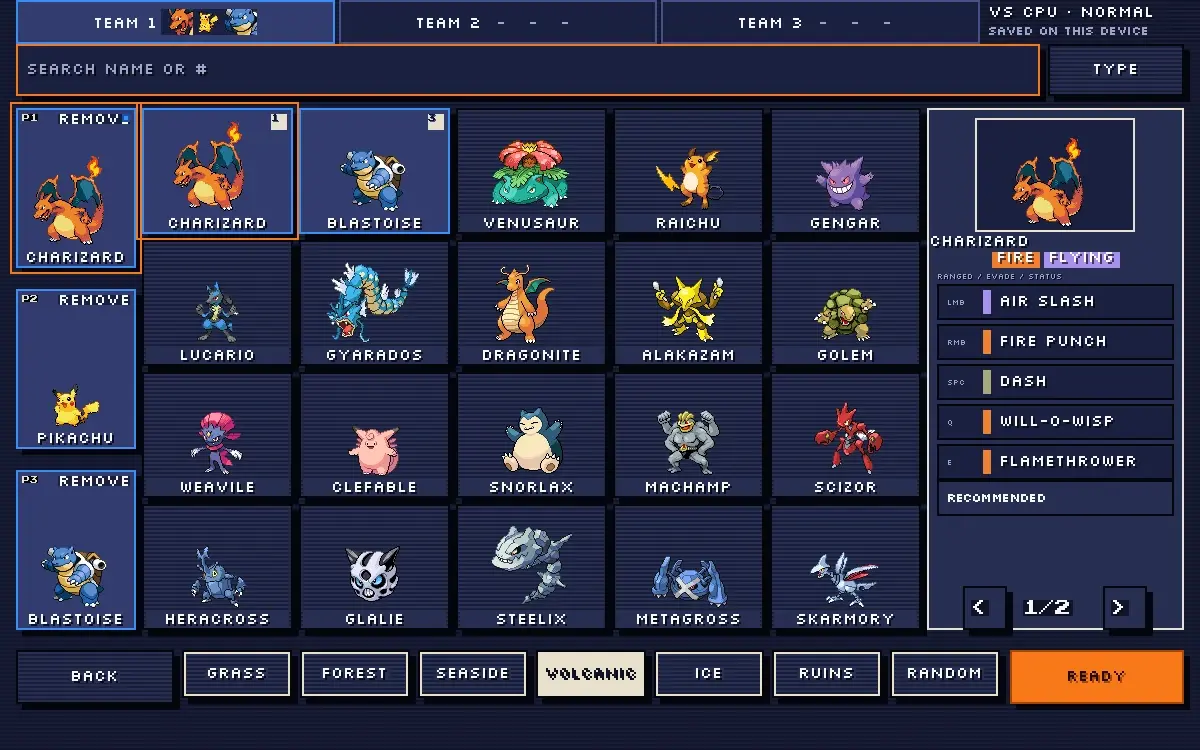
Pick three Pokemon, try different moves, and save up to three teams. Search by name or number, browse by type, or tap RANDOM in an empty team slot for a surprise pick.

  • In Your Teams, select a Pokemon, open a skill's details, and choose CHANGE to see the moves it can use. RECOMMENDED brings back its suggested moves.
  • Team and move choices save automatically in this browser. Bring them into Quick Battle, Vs CPU or Online, and keep each teammate's moves when you switch during a match.
  • All 18 types matter: a good matchup can make your attacks stronger, while some opponents resist them or take no damage.
  • Choose a setting in the team screen, or let Random choose one of the six arenas.
Open the game to build your team
Poke2D Arena team builder with three saved teams, Pokemon choices and customizable moves
Build a trio, choose its moves, and keep three teams ready for your next battle.
Make it yours

A browser arena for computers and phones

Play with keyboard and mouse or touch controls. The six settings are grass, forest, seaside, volcano, ice and ruins.

  • Quick Battle uses your saved team, fills empty slots and starts against a Normal computer opponent.
  • Settings include music and sound levels, mute and reduced flashing. Your trainer name is generated by the game; press ROLL in Settings for another one.
  • Phone options include larger move buttons, a left-handed layout and aim assistance.
  • Online lets you battle another player. Join a waiting room or invite a friend to a private room.
  • Story Mode brings four chapters and sixteen solo challenges. Win to unlock the next stop, or replay a challenge to beat your best time. Story battles use recommended moves.
Read the browser edition updates
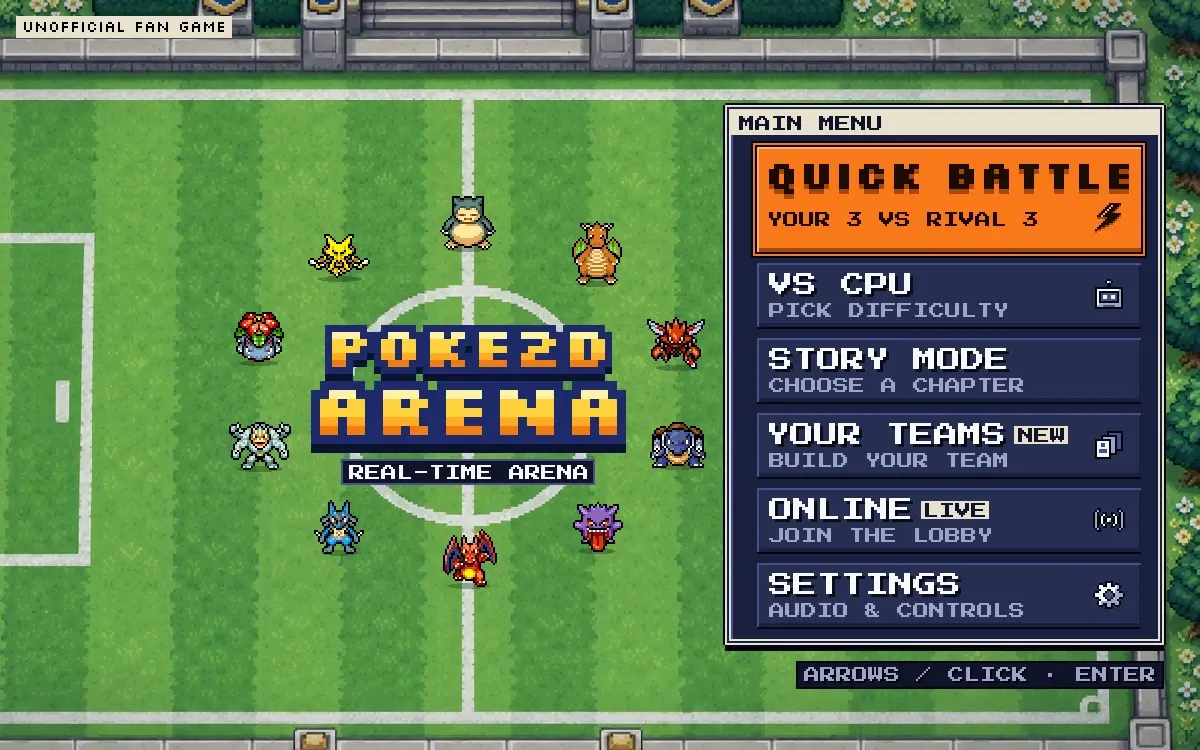
Poke2D Arena main menu with Quick Battle, Vs CPU, Story Mode, Your Teams, Online and Settings
Choose a quick fight, a story challenge or an online battle from the main menu.

Ways to Play — Modes & Battle Scenarios

Quick Battle

Start with your saved trio

Choose Quick Battle in the game menu for a match against a Normal computer opponent. Empty team slots are filled so you can start without building a complete lineup first.

  • Use your saved team
  • Play against the computer
  • Rematch after the result
Open the Quick Battle menu
Vs CPU

Pick your team and your challenge

Choose your Pokemon, pick an arena, and then select Easy, Normal or Hard before the fight. Try a different team when you want a new matchup.

  • Search and filter the roster
  • Choose your computer difficulty
  • Switch teammates during the fight
Open the Vs CPU menu
Your Teams

Prepare your next lineup

Keep three teams, each with three Pokemon and its own move choices. Try a new combination or return to the recommended moves. Your choices save in this browser for your next visit.

  • Save three different teams
  • Choose moves for each Pokemon
  • No account needed
Open the team editor from the menu
Story Mode

Take on sixteen solo challenges

Explore First Tide, Green Lines, Cold Signal and Last Light, meet rivals, and unlock your next challenge with each win. Bring one Pokemon into a story battle, then replay your favorites to improve your time.

  • Four chapters to explore
  • Progress saves in this browser
  • Replay to beat your best time
Choose Story Mode in the game menu
Online

Bring your team, challenge a friend

Create a private room and send your friend the invite link, or join a waiting public room. Each player brings three Pokemon with their chosen moves. Press Ready when you are both set.

  • Two-player battles
  • Use your own team and moves
  • No account needed
Choose Online in the game menu

How to Play Poke2D Arena Online

STEP 01

Open Poke2D Arena

Click Play Online to load the current game in your browser. No download or account is needed. Use an internet connection to load the game and its assets.

Play the browser game
STEP 02

Choose your battle

Quick Battle gets you straight into a fight. Choose Vs CPU to pick your team and difficulty, Story Mode for a solo adventure, or Online to battle another player. Your Teams is where you choose Pokemon and try different moves.

Open the game menu
STEP 03

Move, aim and attack

On a computer, move with WASD or arrows, aim with the mouse, and use left click, right click, Space, Q and E for the move slots. R switches teammates. On a phone, use the joystick, move buttons and team bar. The move bar shows what each slot does.

Try a computer battle

Game Help

Read the Poke2D Arena controls guide for keyboard, mouse and touch instructions, team selection and your first computer battle.

The guide library covers battle rules, a full Story Mode walkthrough, team building and move editing, and the 3 PLAYER BRAWL.

Playing with a friend? Follow the current online multiplayer guide for public and private rooms, invitation links, room codes and getting both teams ready.

Latest Poke2D Arena Updates

The three newest changes to the browser game. The full update log lists every Poke2D Arena release.

Quality of Life

Save Codes, Clearer Move Editing, and a Main Menu Shortcut

Open your save code straight from the main menu, return there after a battle, and see exactly which moves can be edited.

Battle Update

Active Pokemon Now Build Ultimate Charge Over Time

Your active Pokemon now gains one point of ultimate charge every second, while Pokemon waiting on the bench stay frozen.

Collection Update

Card Packs, a Pokedex, and a Fresh Main Menu

Earn coins by finishing battles, open card packs to unlock rare Pokemon, fill your Pokedex through play, and find everything from a refreshed main menu.

See every browser update

Frequently Asked Questions

What can I play on Pokemon Arena 2D?

Play Poke2D Arena, our independent real-time Pokemon battle game. Build a team of three, choose its moves, and battle the computer or another player. Story Mode offers four chapters and sixteen solo challenges. Play free on a computer or phone, with no download or account needed.

Is Poke2D Arena free to play online?

Yes. Poke2D Arena is free to play in a browser, with no download or account required. The website uses advertising to help support hosting. You need an internet connection to load the game and its assets.

Who develops Poke2D Arena?

Poke2D Arena is an independent browser game developed and operated by poke2darena.com. It is not affiliated with Nintendo, The Pokemon Company, GAME FREAK, Creatures Inc., or any other game developer. Player-facing updates are published on this site. Read the release date and update history.

Can I battle a friend online?

Yes. Choose Online from the game menu and create a private room, then send your friend the invite link. You can also join a waiting public room or enter its six-character code. Each player brings three different Pokemon with their chosen moves and presses Ready. No account is required.

Is there a Story Mode?

Yes. First Tide, Green Lines, Cold Signal and Last Light offer sixteen solo challenges, with rivals to meet and more battles to unlock as you win. Choose one Pokemon for each challenge. Your progress and best times save in this browser, and you can replay completed challenges. Story battles use recommended moves rather than your custom team moves.

Can I choose my Pokemon's moves?

Yes. Open Your Teams, select a Pokemon, open a skill's details, and choose CHANGE to browse its available moves. Choices save with that team and work in Quick Battle, Vs CPU and Online. Choose RECOMMENDED to restore the suggested moves. You can keep three teams in the same browser.

Which devices and controls can I use?

Use keyboard and mouse on a computer, or the on-screen joystick and move buttons on a phone. You can tap the team bar to switch Pokemon. Settings include phone button size, left-handed controls, aim assistance, sound levels and reduced flashing.

How do types and arenas work in the current game?

The game uses all 18 Pokemon types, including strengths, resistances and immunities. The six arena settings are grass, forest, seaside, volcano, ice and ruins.

Is there a Pokemon Arena 2D download or APK?

Poke2D Arena is a browser game: no APK or installer is needed, and this site does not distribute a native app. Home-screen shortcuts still need an internet connection. See the mobile play and home-screen guide.

Where are my teams and progress saved?

Your teams, move choices, story progress and settings save in the browser you play in. They do not follow you to another browser or device. Clearing this site's browser data removes those saves. If the game shows NOT SAVED, keep the page open: your latest changes may be lost when you close or refresh it.